Klara 2.0: A Focus Timer That Tracks Your Progress
Klara 2.0 brings focus tracking to Klara's visual focus timer for iPhone — see your Activity Map, focus categories and recent session history, all stored locally on your device.
Klara has always been a simple visual focus timer for iPhone — choose a duration, start the timer, and see the remaining time as a shrinking circle or progress bar. If you haven't used Klara before, the visual timer guide covers how visual timers work and why they're useful for focus, study and work.
Klara 2.0 is now available, and it adds something people have been asking for: a way to see your focus progress over time, without turning Klara into a complicated productivity system.
What's New in Klara 2.0?
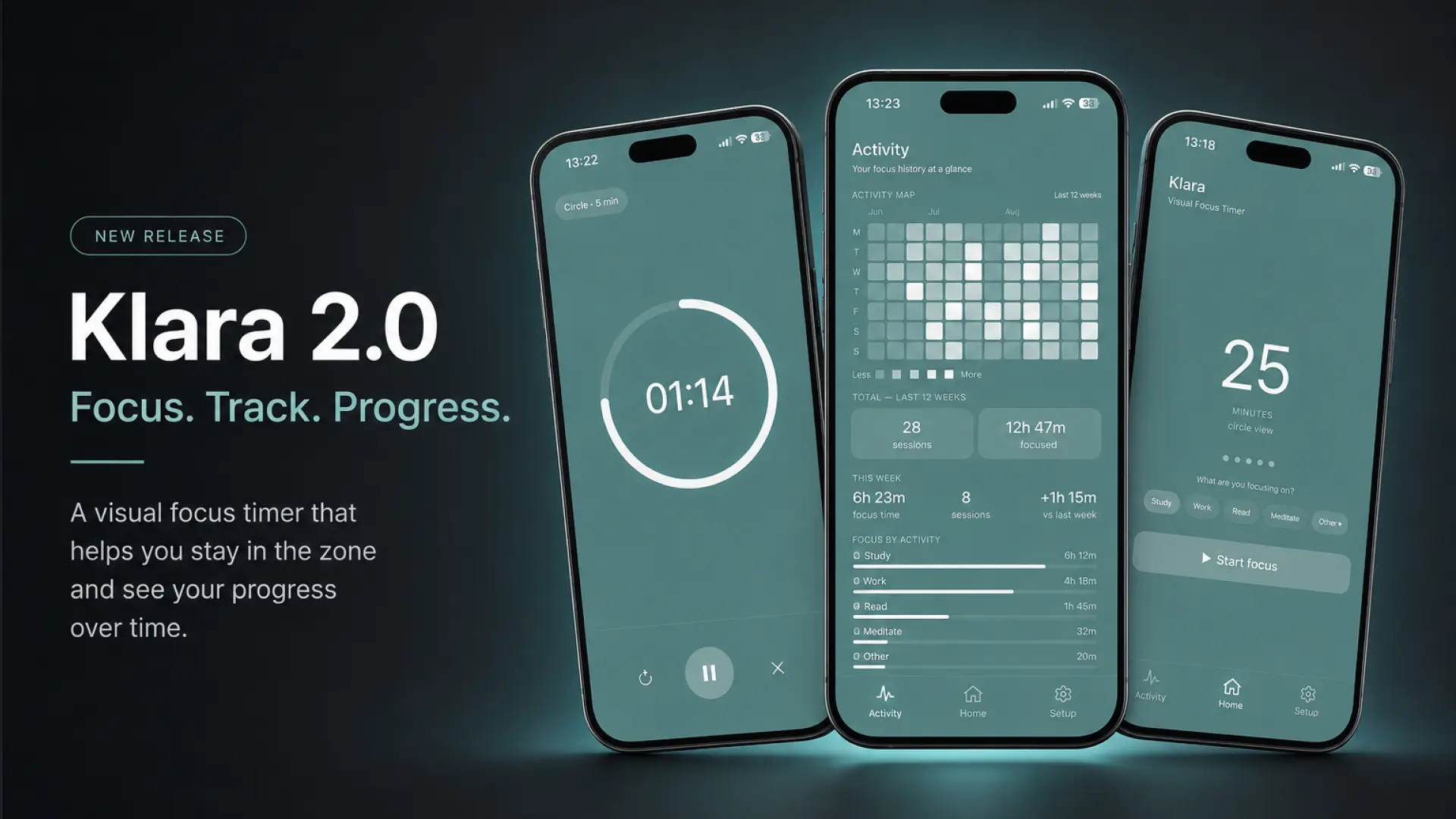
Klara 2.0 introduces focus tracking alongside the timer you already know. Every completed focus session can now be reviewed later, so you can see how your focus time adds up across days and weeks.
- Activity Map. A 12-week view of your focus activity, so you can see your focus sessions at a glance.
- Focus statistics. Total focus time and completed session counts.
- Focus categories. Study, Work, Read, Meditate and Other, so sessions can be grouped by what they were for.
- Session history. A list of your recent focus sessions.
- New color themes. A set of calm, minimal themes to choose from.
- New navigation. Activity, Home and Setup tabs make it easy to move between the timer and your focus history.
Track Your Focus Without the Complexity
Klara is intentionally simpler than productivity apps that combine a timer with task managers, calendars and other systems layered on top. That hasn't changed with 2.0.
Focus tracking in Klara is built to answer one question: how has your focus time been going lately? It's not a task manager, and it doesn't ask you to plan your day around it. You start a focus session the same way you always have — choose a duration, optionally pick a category, and start the timer.
Only completed focus sessions are added to your statistics. If a session is stopped early, it isn't counted, so the numbers you see reflect focus time you actually completed.
See Your Focus Progress
The Activity Map shows the last 12 weeks of focus activity in one view, similar to a contribution graph. It's a quick way to notice patterns — the days you tend to focus more, and the days you don't.
Alongside the map, Klara shows your total focus time and the number of completed sessions, so your progress isn't limited to a single countdown — it builds up into something you can look back on.
Sorting sessions into Study, Work, Read, Meditate or Other makes it possible to see not just how much you focused, but roughly what that time went toward. And the recent session history gives you a simple log of your latest focus sessions, without needing to dig through settings or reports.
A Private Focus Timer for iPhone
All of your focus history and statistics in Klara are stored locally on your device. There's no account to create and no data sent elsewhere to view your Activity Map or session history.
This keeps Klara consistent with how it has always worked — a focus timer for iPhone that respects your privacy, now with a way to see your progress alongside it.